EverythingWeather
- 4.4
- Rating
- 10.00K
- Installs
- Free
- Price

 Analysis by App-foxy
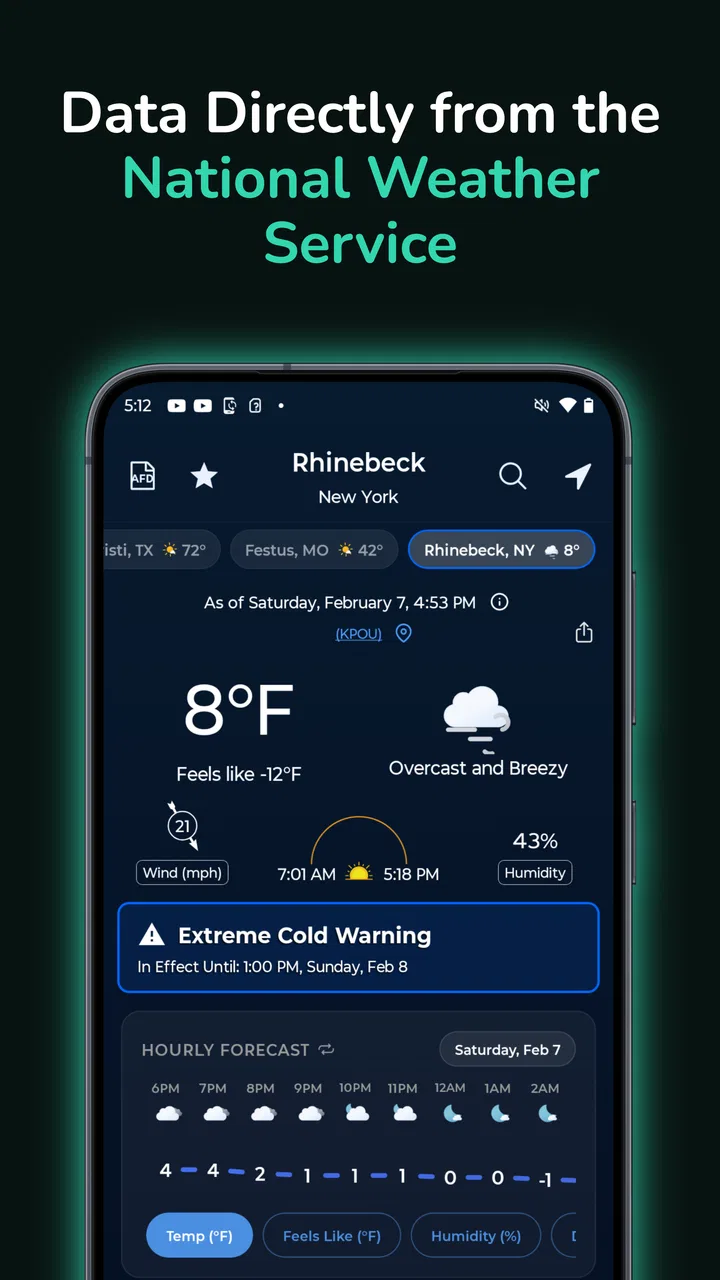
I usually judge a weather app by one simple question: can I open it when I am already late, understand what is happening outside, and make a sensible decision without digging through clutter? EverythingWeather takes a focused approach. It is a free weather app from corymottice that uses information directly from NOAA’s National Weather Service, so its appeal is less about decorative presentation and more about getting weather guidance from a recognized public forecasting source.
After spending time with it, I see a practical tool for people who want weather information to feel closer to an official forecast than to a lifestyle dashboard. It is available for everyone, supports devices running Android 7.0 or later, and the current version is 1.4.23. The app has built a strong impression among its users, with a 4.8 average from around 200 ratings and over 80 written reviews. That is a promising signal, although a smaller user base than the major weather platforms means I would still treat it as a focused alternative rather than a universal replacement.
How EverythingWeather feels in everyday use
I find EverythingWeather most useful when I treat it as a quick decision aid, not a screen to browse: check conditions, connect them to a plan, and move on. That makes it easier to judge whether its NOAA-based approach fits my routine before I rely on it for more involved planning. The next section looks at the first setup and how I would get a useful check out of the app.
You May Also Like

 AccuWeather: Weather Radar
AccuWeather Review: A Quick, Clear Forecast for Everyday Decisions
For everyday plans, the best forecast is the one you can understand quickly. AccuWeather makes rain timing, radar, and local conditions easy to act on, with a few trade-offs.

 Hill Climb Racing
Why Hill Climb Racing Still Turns Crashes Into One More Run
A tiny car, a bumpy hill and one more upgrade: Hill Climb Racing keeps resurfacing because its simple chaos makes every near-miss feel personal.

 AliExpress - Shopping App
AliExpress Makes Global Shopping Feel Personal, but Shoppers Bear the Risk
AliExpress turns a global marketplace into a pocket-sized discovery engine. Its reach is useful, its shopping loop compelling, and its trade-offs easy to miss.

 Lords Mobile: Kingdom Wars
Lords Mobile Is a Kingdom-Building Routine, Not a Quick Match
A case-by-case verdict on the building, battles, device demands, and social commitments that make Lords Mobile rewarding for some players and exhausting for others.

 PDF Scanner app - TapScanner
TapScanner Makes Paperwork Easier to Capture, Check, and Share
TapScanner makes scanning with a phone feel less like a rescue operation and more like a dependable step in getting work done. Its capture tools are useful, though not flawless.

 Block Blast!
 Shows How Much a Puzzle Game Can Leave Out
A quiet grid game shows why puzzle players increasingly value instant clarity, repeatable skill and low-pressure play—and where the genre still needs to catch up.
More From Our News Desk
View All News


Quick checks are where it makes the most sense
The strongest reason to try EverythingWeather is the speed of the decision you are trying to make. If I am leaving for work, deciding whether to carry an umbrella, or checking conditions before a short drive, I do not necessarily want a news feed, animated map layers, promotional cards, and unrelated alerts competing for attention. A NOAA National Weather Service-based app can feel more direct because the central purpose is the forecast itself.
That focus matters most during short sessions. Weather apps are often opened for only a few seconds, and a good experience should respect that. EverythingWeather is best approached as a tool for repeated glances rather than an app I would sit inside for entertainment. Its short description, “EverythingWeather,” suggests broad weather coverage, but the more useful way to think about it is as a compact reference point for planning ordinary activities.
One realistic example is a morning school run. I can check the forecast before leaving, look at the expected conditions for the return trip, and decide whether a child needs a coat or rain protection. Later, before walking home, I can check again instead of relying on memory. That workflow is more useful than simply knowing whether the current temperature is pleasant, because it connects the forecast to a specific decision.
The NOAA connection is also meaningful for users who prefer public-service forecasting over apps that place a heavy emphasis on visual polish. It does not automatically make every forecast perfect, since weather remains changeable and local conditions can shift quickly. Still, it gives the app a clear identity: the information source is part of the reason to use it, not just background branding.
What feels fast, and what may slow the experience
My expectation of EverythingWeather is that it should feel quick during normal checks because its job is narrow. Opening a weather app and reading a forecast is a lighter task than browsing a multimedia service, and the app’s modest scale supports that focused impression. I would not choose it because I expect elaborate visual effects or a large collection of entertainment-style screens. I would choose it because a direct forecast can reduce the number of steps between opening the app and making a decision.
There is an important distinction here. A simple interface can make reading faster, but the forecast still depends on obtaining current information. If the connection is weak or the source is updating, the experience may not feel instantaneous. That is not a reason to dismiss the app; it is a reminder that a weather tool is partly dependent on timely data access. For a commuter standing outside with poor reception, I would check the forecast before entering a low-signal area rather than waiting until the last moment.
I also would not confuse a clean weather check with a complete storm-monitoring workstation. People who need many layers, extensive radar analysis, or a highly visual approach may find a larger mainstream weather service more satisfying. EverythingWeather’s advantage is the shorter path to everyday information, while its trade-off is that users who enjoy exploring weather details may want a more elaborate companion.
Handling busy periods and repeated checks
Weather becomes harder to evaluate when conditions are changing quickly. Before a trip, during a thunderstorm, or around a sudden temperature drop, I may open the app repeatedly and compare what I see with what I observed outside. This is where a focused design can help: repeated checks are easier when the app does not make me navigate through unrelated content every time.
A useful habit is to check at three points rather than treating one forecast as a promise: before leaving, shortly before the most important outdoor activity, and again if the sky changes noticeably. EverythingWeather fits that routine because its value is in returning to the forecast, not in producing a single morning verdict. I would use that approach for gardening, cycling, walking a dog, or deciding whether outdoor work should happen now or later.
For heavier use, I would keep expectations realistic. Checking several locations or returning frequently during unsettled weather can make any weather app feel less effortless than a single glance. The more questions I ask, the more important it becomes to understand what information is immediately visible and what requires additional navigation. EverythingWeather is most convincing when I need practical awareness, not when I want to conduct a detailed meteorological investigation.
Another non-obvious trade-off is that official-source focus can encourage me to trust the forecast more carefully, but it should not encourage overconfidence. A public forecast is useful context, not a guarantee that a particular street will remain dry. Local terrain, buildings, and fast-moving showers can produce conditions that differ from a broad forecast. I would use the app to prepare, then still look outside and adjust when the situation clearly changes.
Reliability, confidence, and recovery after interruptions
Reliability is not only about whether an app opens. For a weather app, it also means that I can understand where the information comes from, return to it regularly, and recover sensibly when an update is delayed or interrupted. EverythingWeather has a clear source identity through NOAA’s National Weather Service, which gives me more context than an app that presents numbers without explaining the forecasting foundation.
The app’s user response is encouraging. A 4.8 average and around 200 ratings indicate that the people who have rated it generally like the experience. With over 80 reviews, there is also enough written feedback to suggest that the positive impression is not based on a single isolated reaction. I still would not treat those figures as proof that every device, location, or forecasting situation will behave identically. They are a reason to investigate the app, not a substitute for personal testing.
For recovery, my practical advice is simple: if a forecast does not appear current, do not make a high-consequence decision from a stale screen. Reopen the app when connectivity improves, compare the result with what is happening outside, and use a second source for urgent travel or severe-weather decisions. That is a sensible workflow for any weather service, including one built around an official forecasting source.
I also appreciate that the app’s identity is easy to explain to another person. If a friend asks why I use it, I can say that it is a weather app centered on NOAA National Weather Service information. That clarity is a reliability benefit in its own way: I know what role it plays, and I am less likely to expect it to be a radar-heavy emergency console, a social weather network, or a travel-planning suite.
Older phones and practical device limits
Support for Android 7.0 or later makes EverythingWeather accessible to people who are not using a recent phone. That matters because weather checks are often performed on a spare device, an older handset, or a phone kept for basic communication. A broad minimum operating-system requirement can make the app easier to consider when upgrading hardware is not a priority.
At the same time, compatibility is not the same as identical performance on every device. An older phone may open apps more slowly, manage background activity differently, or struggle more when several applications are competing for memory. I would expect EverythingWeather’s focused purpose to be less demanding than a visually intensive weather platform, but I would still judge it on the particular phone I own rather than assuming that the oldest supported system will feel as quick as a new device.
For battery-conscious users, a sensible workflow is to open the app when needed instead of leaving every possible weather service active at once. I would also avoid keeping multiple weather apps constantly refreshing unless I genuinely need their different strengths. This is not a criticism aimed only at EverythingWeather; it is a practical way to reduce duplicated work on any phone.
The app is rated for everyone, which makes it suitable for a household where different people need access to basic weather information. A parent can introduce it to a child who is learning to prepare for the day, while an older family member can use it as a straightforward forecast reference. The main limitation is not age suitability but expectations: someone wanting advanced weather analysis may outgrow its focused approach, while someone wanting a simple check may appreciate it immediately.
Free access, optional spending, and who should choose it
EverythingWeather is free to download, which makes trying it low-risk. There are in-app purchases priced from $3.99 to $34.99 per item, so I would look at the available purchase choices before paying and decide whether they solve a problem I actually have. The free entry point is especially useful for testing the app on an older phone, checking how quickly it fits into a morning routine, and seeing whether the NOAA-based presentation suits the way I read forecasts.
I would recommend it to someone who wants a dedicated weather reference without turning weather into a large content experience. It is a good candidate for a person who values a public forecasting source, checks conditions several times a day, uses an older Android device, or prefers practical information over visual decoration. It also makes sense for households that want an everyone-friendly tool rather than a specialized professional system.
I would skip it if my priority were extensive visual analysis, a broad ecosystem of travel features, or a highly customized weather dashboard. In those cases, a larger alternative may offer more layers and integrations. I would also be cautious about making it my only source for safety-critical decisions. For ordinary planning it can be useful; for dangerous weather, long-distance travel, or rapidly changing conditions, I would verify important information through additional official channels.
Small habits that make the app more useful
My first tip is to define the decision before opening the app. Instead of vaguely checking the weather, I ask whether I am choosing clothing, timing an errand, planning exercise, or deciding if an outdoor job can continue. That keeps the forecast connected to an action and prevents me from overinterpreting minor changes.
My second tip is to build a repeat-check routine around transitions. I would look once before leaving home, once before the activity that matters most, and once if the conditions outside contradict the earlier impression. This is more reliable than checking once and assuming the day will follow the same pattern. It also plays to the app’s strength as a quick reference rather than forcing it to serve as a constant monitoring station.
My third tip is to use its source identity as a comparison point. If another weather app gives a different answer, I would not immediately decide that EverythingWeather is wrong. I would compare the forecast period, location, and update timing, then consider which source better fits the decision I am making. The useful insight is not that one app always wins; it is that EverythingWeather gives me a clear public-service baseline against which other presentations can be judged.
My fourth tip is to test it during ordinary weather before depending on it during a stressful situation. Install it, check a normal workday, try it before a weekend walk, and see how naturally it fits your phone and habits. That trial will reveal more about perceived speed, readability, and recovery on your device than a generic promise ever could.
My performance verdict
EverythingWeather succeeds because it has a recognizable purpose. It is not trying to be a flashy weather entertainment hub; it is a focused app built around NOAA’s National Weather Service information. In my experience, that makes it most appealing for quick, repeated checks where clarity and source confidence matter more than a long list of extras.
Its performance story is therefore practical rather than dramatic. The app should suit short sessions, can be considered for older Android phones because it supports Android 7.0 onward, and has earned a strong 4.8 average from around 200 ratings. Those details support the impression of a well-received, accessible tool, while the smaller install base of over 10 thousand users suggests a more specialized audience than the biggest names in weather.
The main trade-off is choice. A focused app may feel faster to understand, but a larger alternative may be better when I want deep visual layers, extensive customization, or a broad travel-planning package. I would also keep a second source in mind for urgent conditions, because no forecast should replace judgment about what is happening outside.
Overall, I would recommend EverythingWeather to a friend who wants a straightforward, free weather app with a clearly identified NOAA National Weather Service foundation. It is especially worth trying if your current weather app feels crowded or if you use an older Android phone. The best reason to install it is not the number of screens it offers, but how quickly it can turn an official forecast into a practical everyday decision.
FAQs for EverythingWeather
01What features does EverythingWeather offer?
EverythingWeather provides real-time weather updates, detailed forecasts, and severe weather alerts. Users can also access radar and satellite imagery, track storms, and set up personalized weather notifications. The app includes a widget for quick access to the current weather conditions and forecasts for multiple locations.
02Is EverythingWeather free to use?
EverythingWeather is free to download and offers basic features at no cost. However, it also includes premium features that require a subscription. These may include advanced radar features, ad-free usage, and extended forecast data. Users can choose to purchase a monthly or annual subscription based on their needs.
03How accurate is the weather data in EverythingWeather?
EverythingWeather sources its data from reliable meteorological services, ensuring high accuracy in weather forecasting. The app updates information frequently to provide the latest weather conditions. It also uses advanced algorithms to predict weather patterns and provide users with precise forecasts for their location.
04Can I customize weather alerts in EverythingWeather?
Yes, EverythingWeather allows users to customize weather alerts according to their preferences. Users can set alerts for severe weather conditions, such as thunderstorms or tornadoes, and decide how they are notified—whether through push notifications, emails, or in-app alerts. This helps users stay informed and prepared for any weather changes.
05Is EverythingWeather compatible with all devices?
EverythingWeather is available for both Android and iOS devices, ensuring broad compatibility. It supports a wide range of smartphones and tablets, requiring a minimum operating system version which is typically specified in the app store. Users should ensure their device meets these requirements for optimal performance.
Pros
- Accurate forecasts with real-time updates.
- User-friendly interface for easy navigation.
- Customizable alerts for severe weather.
- Detailed radar maps for precise tracking.
- Multiple location tracking for travelers.
Cons
- Ads can be intrusive during use.
- Limited features in the free version.
- Occasional slow loading times.
- Requires internet for full functionality.
- Some features locked to premium users.

EverythingWeather
Gallery